Deep Learning Installation Guide: From GPU to Monitor, the latest recommendations for the complete set of hardware

Deep Learning Installation Guide: From GPU to Monitor, the latest recommendations for the complete set of hardware


Xiaocha Annie Guo Yipu
reported from the qubit of the Aofei Temple | Official Account QbitAI
Hardware equipment is an indispensable core equipment for any deep learning agent. Dear primary scribbling magicians, do you feel that the destined wand is missing?

However, how should we choose various CPUs, GPUs, memory sticks, peripherals, and so many brands, types and numbers?
In order to help you get a set of equipment that you can build, a young man named Tim Dettmers condensed his installation experience of assembling seven workstations in a year into a practical guide to share it, helping you determine a complete set of hardware selection, and also made recommendations based on this year’s new hardware.
Okay, let’s start with the GPU and see how each important component should be selected in turn. The full text is more than 5,000 words, and the estimated reading time is 11 minutes. Of course, at the end of the article, we have prepared a ” element list ” for everyone ~
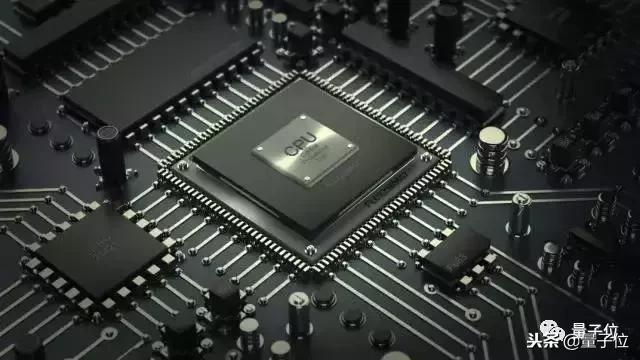
GPU
Graphics cards (GPUs) are important components of deep learning, even more important than CPUs. It is obviously unwise to do deep learning without using GPU and just using CPU, so the author Tim first introduced the choice of GPU.
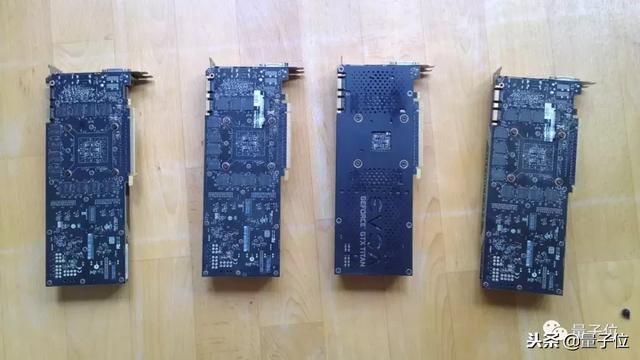
There are three major things to note when purchasing a GPU: cost-effectiveness, video memory, and heat dissipation.
Use the 16-bit RTX 2070 or RTX 2080 Ti to be more cost-effective. In addition, it is also a good choice to buy second-hand 32bit GTX 1070 , GTX 1080 or 1080 Ti on eBay .
In addition to the GPU core, video memory (GPU RAM) is also a part that cannot be ignored. RTX has more advantages in terms of graphics memory than GTX series graphics cards. With the same graphics memory, RTX can train models that are twice as large.
The usual requirements for video memory are as follows:
- If you want to pursue the highest score in your research: video memory >=11 GB;
- Search for interesting new architectures in the research: video memory >=8 GB;
- Other studies: 8GB;
- Kaggle competition: 4~8GB;
- Startup: 8GB (depending on the model size of the specific application)
- Company: Create a prototype of 8GB, training is no less than 11GB
It should be noted that if you purchase multiple RTX graphics cards, you must not ignore the heat dissipation. The two graphics cards stacked in adjacent PCI-e slots can easily overheat the GPU and reduce frequency, which may result in a 30% performance drop. This issue will be discussed in detail later.
Memory
There are two parameters for selecting memory (RAM) : clock frequency and capacity. Which of these two parameters is more important?
Clock frequency
Hype about memory clock frequency is a commonly used marketing method by manufacturers. They promote the faster the memory, the better. Is this really the case?
Linus Tech Tips, a well-known digital blogger, answered this question: manufacturers will lure you to buy “faster” RAM, but in fact there is little performance improvement.
The memory frequency has nothing to do with the speed of data transfer to video memory. The increase in frequency can only have a performance improvement of up to 3%. You should spend your money elsewhere!
Memory capacity
Memory size does not affect deep learning performance, but it may affect the efficiency of your execution of GPU code. With a larger memory capacity, the CPU can directly exchange data with the GPU without going through the disk.
Therefore, users should be equipped with memory capacity that matches the GPU video memory. If you have a Titan RTX with 24GB of video memory, you should have at least 24GB of memory. However, if there is more GPU, you don’t necessarily need more memory.
Tim believes that memory is related to whether you can concentrate resources and solve more difficult programming problems. If you have more memory, you can focus on more pressing issues without spending a lot of time solving memory bottlenecks.
He also found that extra memory is very useful for feature engineering while competing in Kaggle.
CPU
Too much attention to CPU performance and PCIe channel number is a common cognitive misunderstanding. What users need to pay more attention to is the number of GPUs that support running simultaneously with the CPU and motherboard combination.
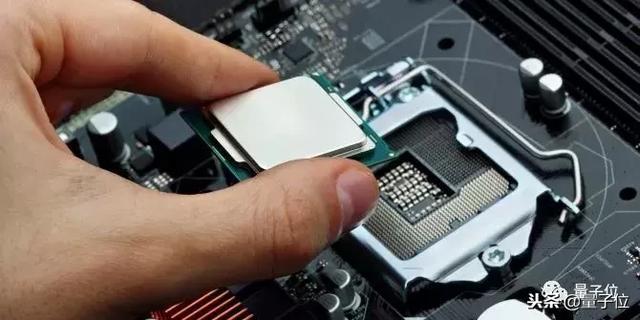
CPU and PCIe
People’s obsession with PCIe channels is almost crazy! In fact, it has little impact on deep learning performance.
If there is only one GPU, the PCIe channel is only used to quickly transfer data from memory to video memory.
The 32 images (32x225x225x3) in ImageNet take 1.1 milliseconds to transmit on 16 channels, 2.3 milliseconds to 8 channels, and 4.5 milliseconds to 4 channels.
These are just theoretical numbers, and in fact, PCIe’s speed is only half that of the theory. PCIe channels usually have nanosecond-level delays, so the delay can be ignored.
Tim tested the transmission time required to train the ResNet-152 model using mini-batch with 32 ImageNet images:
- Forward and Backward Transmission: 216 ms
- 16 PCIe Channels CPU->GPU Transfer: About 2 milliseconds (theoretical 1.1 milliseconds)
- 8 PCIe Channels CPU->GPU Transfer: Approximately 5 milliseconds (2.3 milliseconds)
- 4 PCIe Channels CPU->GPU Transfer: Approximately 9 milliseconds (4.5 milliseconds)
Therefore, in total time, from 4 to 16 PCIe channels, the performance improvement is about 3.2%. However, if PyTorch’s data loader has fixed memory, the performance is improved to 0%. So, don’t waste money on PCIe channels if you use a single GPU.
When selecting CPU PCIe channel and motherboard PCIe channel, make sure that the combination you choose can support the number of GPUs you want. If you buy a motherboard that supports 2 GPUs and want to use 2 GPUs, you have to buy a CPU that supports 2 GPUs, but you don’t have to check the number of PCIe channels.
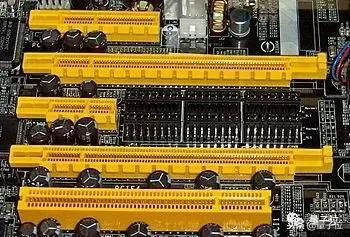
PCIe channel and multi-GPU parallel computing
If you train a network on multiple GPUs, is the PCIe channel important? Tim once published a paper in ICLR 2016, pointing out ( https://arxiv.org/abs/1511.0456 1): If you have 96 GPUs, then PCIe channel is very important.
However, if the number of GPUs is less than 4, you don’t have to care about the PCIe channel at all. Almost few people run more than 4 GPUs at the same time, so don’t waste money on PCIe channels. This doesn’t matter!
Number of CPU cores
In order to choose a CPU, you first need to understand the relationship between CPU and deep learning.
What role does CPU play in deep learning? When running a deep network on a GPU, the CPU does little calculations. The main functions of the CPU are: (1) Start GPU function calls (2) Execute CPU functions.
By far, the most useful application of CPU is data preprocessing. There are two different general data processing strategies with different CPU requirements.
The first strategy is to preprocess during training, and the second is to preprocess before training.
For the first strategy, high-performance multi-core CPUs can significantly improve efficiency. It is recommended that each GPU has at least 4 threads, i.e., to allocate two CPU cores to each GPU. Tim expects that every time one core is added to the GPU, an additional performance boost should be achieved in about 0-5%.
For the second strategy, no very good CPU is required. It is recommended that each GPU has at least 2 threads, i.e. allocate one CPU core to each GPU. With this strategy, more cores will not significantly improve performance.
CPU clock frequency
Is the CPU performance of 4GHz stronger than that of 3.5GHz? For comparisons of processors in the same architecture, it is usually correct. However, between processors in different architectures, frequency comparison cannot be simply compared. CPU clock frequency is not always the best way to measure performance.
In the case of deep learning, the CPU participates in very little calculations: such as adding some variables, evaluating some boolean expressions, and making some function calls within the GPU or program. All of this depends on the CPU core clock rate.
While this reasoning seems wise, the CPU still has 100% usage when running a deep learning program, so what is the problem here? Tim did some CPU downsizing experiments to find out the answer.
Effects of CPU downs on performance:
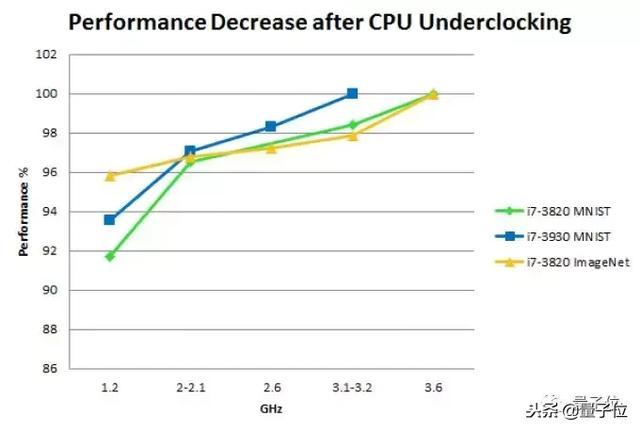
Note that these experiments were performed on some “old” CPUs (the third generation Core processors launched in 2012). But it should still be suitable for CPUs launched in recent years.
Hard disk/solid-state drive (SSD)
Usually, hard disks will not restrict the operation of deep learning tasks, but if you underestimate the function of hard disks, you may pursue, regret, and not to.
Imagine that if the data you read from the hard disk is only 100MB/s, then loading a mini-batch of 32 ImageNet images will take 185 milliseconds.
Conversely, if the data is obtained asynchronously before using it, the data for these mini-batches will be loaded in 185 milliseconds, while the computation time of most neural networks on ImageNet is about 200 milliseconds. So, load the next mini-batch when computing the state and there will be no loss in performance.
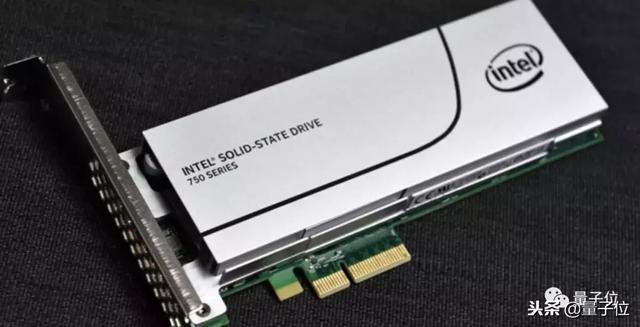
Brother Tim recommends solid-state drives (SSDs), which he believes are both comfortable and efficient when using SSDs. Compared with ordinary hard disks, SSD programs start and respond faster, and preprocessing of large files is much faster.
The top-end experience is NVMe SSD, which is smoother than ordinary SSDs.
Power supply unit (PSU)
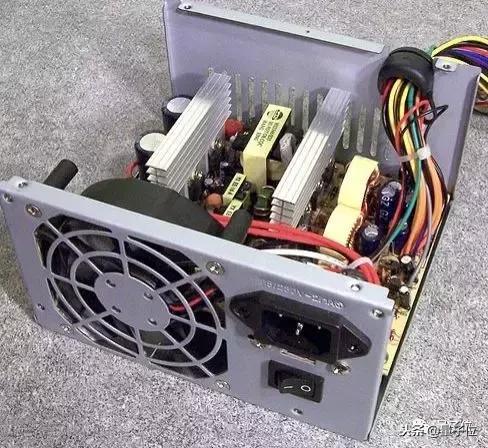
The most basic expectation of a programmer for power supply is to meet the energy required by various GPUs. As GPUs develop towards lower energy consumption, a PSU with excellent quality can accompany you for a long time.
How should I choose? Brother Tim has a set of calculation methods: add the power of the computer CPU and GPU, and add 10% of the power to calculate the energy consumption of other components, and the power peak is obtained.
For example, if you have 4 GPUs, each with 250 watts of power and a CPU with 150 watts, you need the power supply to provide 4×250+150+100=1250 watts of power.
Tim usually adds an additional 10% on this basis to ensure that it is foolproof, which will require a total of 1375 watts. Therefore, in this case, the power supply performance needs to reach 1400 watts.
It should not be difficult to understand how to teach step by step. It is also important to note that even if a PSU reaches the required wattage, there may not be enough PCIe 8-pin or 6-pin connectors, so when buying, make sure there are enough connectors on the power supply to connect to the GPU.
Also, buy a power supply with a high energy efficiency level, especially when you need to connect to a lot of GPUs and may run for a long time, you know the reason.
Let me give you another example. If you run a 4 GPU system at full power (1000-1500 watts) and spend two weeks training a convolutional neural network, it will consume 300-500 kWh of electricity. Calculated at 0.2 euros per kilowatt-hour in Germany, the final electricity bill is equivalent to RMB 455-766.
If the power supply efficiency is reduced to 80%, the electricity bill will increase by 140-203 yuan.
The more GPUs you need, the more obvious the gap will be. Is the choice of PSU a little more complicated than I thought?
Cooling of CPU and GPU
For CPUs and GPUs, poor heat dissipation will reduce their performance.
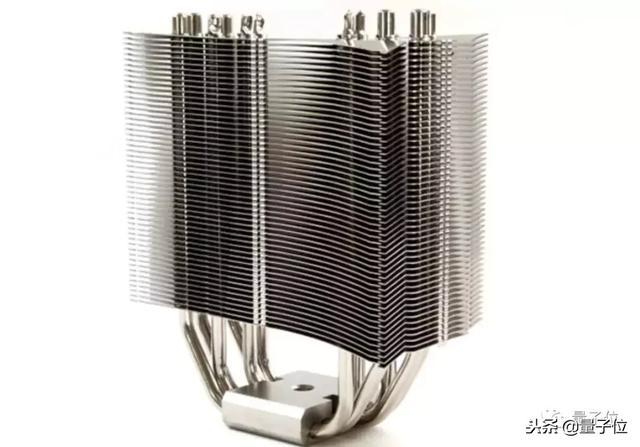
For CPUs, standard radiators or AIO water-cooled radiators are good choices.
But it is a complicated matter which heat dissipation solution to the GPU.
Air-cooled heat dissipation
If there is only a single GPU, air cooling is safe and reliable, but if you have as many as 3-4 GPUs, air cooling may not meet the needs.
Current GPUs will increase the speed to maximum when running the algorithm, so the power consumption will also reach the maximum. Once the temperature exceeds 80℃, it is very likely to reduce the speed and cannot achieve optimal performance.
This phenomenon is more common for deep learning tasks. A general cooling fan is far from achieving the desired effect and reaches the temperature threshold after running for a few seconds. If you use multiple GPUs, the performance may be reduced by 10% to 25%.

what to do? At present, many Nvidia GPUs are designed for gaming, so they have specially optimized for Windows systems and can also easily set up fan solutions.
But this trick cannot be used in Linux systems. The trouble is that many deep learning libraries are also written for Linux.
This is a problem, but it is not unsolvable.
In Linux systems, you can configure Xorg servers and select the “coolbits” option, which still works well for a single GPU.
If you have multiple GPUs, you have to simulate a monitor. Brother Tim said he tried it for a long time, but there was still no improvement.
If you want to run in an air-cooled environment for 3-4 hours, you should pay attention to the fan design.
There are roughly two principles for cooling fans on the market: a blower fan pushes hot air from the back of the chassis to allow cool air to come in; a non-blowing fan sucks air in the GPU to achieve cooling effect.
So, if you have multiple GPUs adjacent to each other, there is no cold air available around you, so in this case, you must not use a non-blowing cooling fan .
Then what to use? Then look down—
Water cooling heat dissipation
Although water-cooling cooling is slightly more expensive than air-cooling, it is very suitable for situations where multiple GPUs are adjacent. It can hold the four most powerful GPUs to keep the whole body cool, which is an effect that air-cooling cannot achieve.

In addition, water cooling can be performed more quietly, and the advantages of water cooling are more prominent if you run multiple GPUs in a common area.
As for the cost issue that everyone is most concerned about, a water-cooled single GPU costs about US$100 (about RMB 690) and some additional upfront costs (about RMB 350).
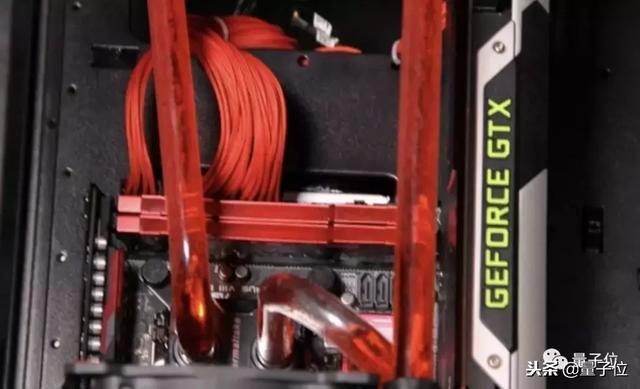
In addition to financial preparation, you also need to invest some energy, such as spending extra time assembling a computer, etc. There are already many online tutorials on this kind of thing, and it only takes a few hours to complete, and the later maintenance is not complicated.
in conclusion
For a single GPU, air cooling is cheap and sufficient; for multiple GPUs, blown air cooling is cheaper, which may cause a performance loss of 10% to 15%. If you want to pursue the ultimate heat dissipation, water cooling will be quiet and have the best effect.
Therefore, air-cooling or water-cooling is reasonable, depending on your actual situation and budget. But the guy finally suggested that under normal circumstances, it is better to consider low-cost air cooling.
Motherboard
The motherboard should have enough PCIe slots to support the required number of GPUs. But it should be noted that most graphics cards need to occupy two PCIe slots in width.
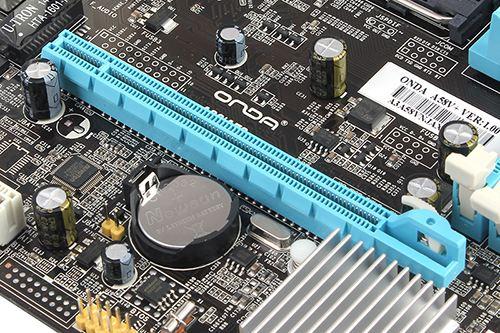
If you plan to use multiple GPUs, you need to purchase a motherboard with enough space between the PCIe slots to ensure that the graphics cards do not block each other.
Chassis
When choosing a chassis, you must ensure that the chassis can install the full-length GPU on the top of the motherboard. Although most chassis are fine, if you buy it smaller, it depends on whether the merchant gives you seven days and no reason…
Therefore, it is best to confirm the size and specifications of the chassis before buying, or search for the picture of the chassis containing the GPU. If there are other people’s finished pictures, you can buy it with confidence.
In addition, if you want to use custom water cooling, make sure your chassis can be installed with a radiator, especially when using custom water cooling for the GPU, the radiator of each GPU needs to take up space.
monitor
How to use the monitor?
Must be taught.
Tim releases the buyer show:
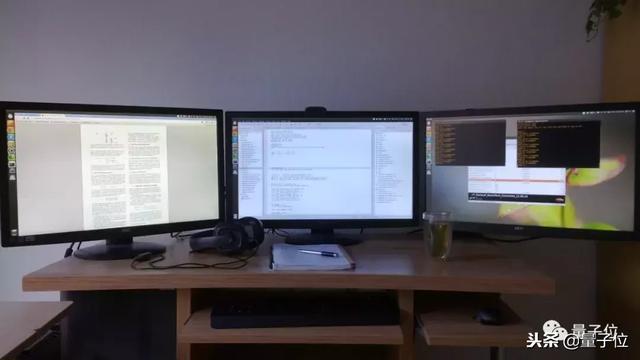
Yes, as a mature technician, using multiple monitors is the basic configuration.
Imagine stacking the contents on these three monitors on the buyer show on the same screen and switching windows back and forth. How tiring it is.
Too long to watch the version
GPU :
RTX 2070, RTX 2080 Ti, GTX 1070, GTX 1080, GTX 1080, these are all good.
CPU :
1. Equip each GPU with 1-2 CPU cores, which depends on how you preprocess the data;
2. The frequency should be greater than 2GHz, and the CPU should be able to support your GPU number;
3. The PCIe channel is not important.
Memory :
1. The clock frequency doesn’t matter, just buy the cheapest memory;
2. Memory ≥ The RAM of the GPU with the largest video memory;
3. Don’t need to be too large, buy as much as you want;
4. If you often use large datasets, it will be useful to buy more memory.
Hard disk/SSD :
1. Prepare a large enough hard disk (≥3TB) for your data set;
2. It is more comfortable to use with SSD and can also preprocess small data sets.
PSU :
1. The maximum required power value ≈ (CPU power + GPU power) × 110%;
2. Buy a high-efficiency power supply, especially when you need to connect to a lot of GPUs and may run for a long time, which can save a lot of electricity bills;
3. Before buying, please make sure that there are enough connectors (PCIe 8-pin or 6-pin) on the power supply to connect to the GPU.
Heat dissipation :
CPU:
Standard configuration CPU radiator or AIO water-cooled radiator;
GPU:
1. Single GPU, air-cooled and heat-dissipated;
2. If you use multiple GPUs, choose blower air-cooled heat dissipation or water-cooled heat dissipation.
Motherboard :
Prepare as many PCle slots as possible to link GPUs. One GPU requires two slots, and each system has up to 4 GPUs, but you also need to consider the thickness of the GPU.
monitor :
To improve efficiency, buy more screens.
My brother who has published three top-level doctoral students
Tim Dettmers, the author of this guide, graduated with a master’s degree last year and is currently studying PhD at the University of Washington. He mainly studies knowledge expression, question-and-answer systems and common sense reasoning. He has interned in the UCL machine learning group and Microsoft.

According to the doctoral program after graduation last year, Tim’s PhD has only been a year and a half, and now he is the author of three top-summary papers, including one of which is AAAI and one of which is ICLR and the only author.
In addition, he is also a Kaggle enthusiast, and once ranked 63rd in the world (top 0.22%) in 2013.
One More Thing
Actually, after saying so much, you don’t want to install the machine, right?
Tim had already expected that, in addition to the installation guide, he also took the initiative to contribute some installation encouragement:
Although buying hardware is expensive, it will hurt if you make a mistake by mistake, don’t be afraid of installing a computer.
First, the installation itself is very simple. The motherboard manual clearly writes how to install it, which is not much more difficult than installing Lego. It also comes with a lot of guides and step-by-step operation videos. Even if you are a novice in experience, you can learn it.
Second, as long as there is a first installment, it will not be difficult later, because all computers are composed of those hardware. Therefore, just install it once and you can get a lifelong skill, with a very high return on investment.
So, come on, prepare your own equipment ~

Portal
original:
A Full Hardware Guide to Deep Learning
http :// timdettmers.com/2018/12/16/deep-learning-hardware-guide/
Recommended by the author, digital blogger Linus Tech Tips answers questions: Is high-frequency memory useful for performance improvement? (Official Chinese version of Bilibili):
https://www. bilibili.com/video/av14 528439
——End — Quantum bits· QbitAI TS TS TS TS ‘ ᴗ’ TS Tracking new trends in AI technology and products

Everyone is welcome to follow us and subscribe to our Zhihu column to
sincerely
recruit editors/reporters. The work location is in Zhongguancun, Beijing. Looking forward to talented and enthusiastic classmates joining us!
For related details, please reply to the word “recruitment” in the QbitAI dialogue interface.
CPU/GPU/TPU/NPU…What does XPU mean?

CPU/GPU/TPU/NPU…What does XPU mean?
CPU / GPU / TPU / NPU …What does XPU mean?
In this era, technology is changing with each passing day, concepts such as the Internet of Things, artificial intelligence, and deep learning are everywhere, and various chip terms GPU, TPU, NPU, and DPU are emerging one after another… What the hell is it? What is the relationship with the CPU?

HW has released a new Mate phone, which has an NPU called inside. It sounds amazing. What is this? It is an artificial intelligence processor.
What is an artificial intelligence processor? What’s the difference between it and CPU? What’s the difference between it and GPU? Don’t you bring a PU?
This article will give you some popular science on these so-called “XPUs”!
CPU
The CPU (Central Processing Unit) is the “brain” of the machine, and it is also the “commander-in-chief ” who lays out strategies, issues orders, and controls actions .
The CPU structure mainly includes an arithmetic and Logic Unit, a control unit (CU, Control Unit), a register (Register), a cache (Cache), and a bus for communication data, control and status.
Simply put, it is: computing unit, control unit and storage unit , the architecture is shown in the figure below:
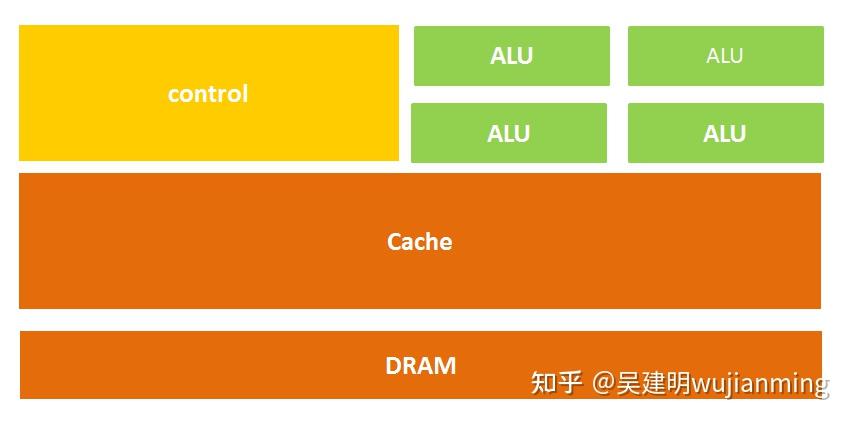
Figure: CPU micro architecture diagram
Another way to express:
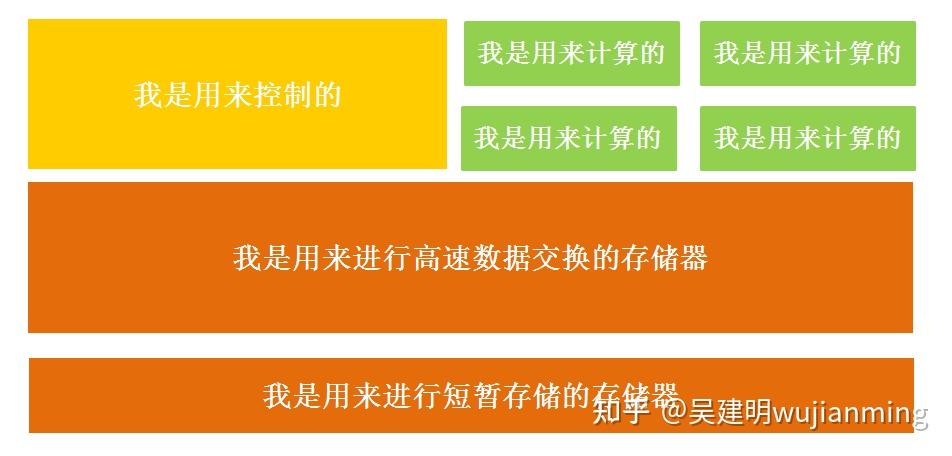
Figure: CPU micro architecture diagram (change)
That’s probably what it means.
It is also easy to understand literally. The calculation unit mainly performs arithmetic operations, shifting and other operations, as well as address operations and conversion; the storage unit is mainly used to save data and instructions generated in the calculation; the control unit decodes the instructions and issues control signals to complete the various operations to be performed by each instruction.
Therefore, the process of an instruction being executed in the CPU is as follows: after reading the instruction, it is sent to the controller (yellow area) through the instruction bus for decoding, and a corresponding operation control signal is sent; then the operator (green area) calculates the data according to the operation instructions, and stores the obtained data into the data buffer (large blocks of orange areas) through the data bus. The process is shown in the figure below:
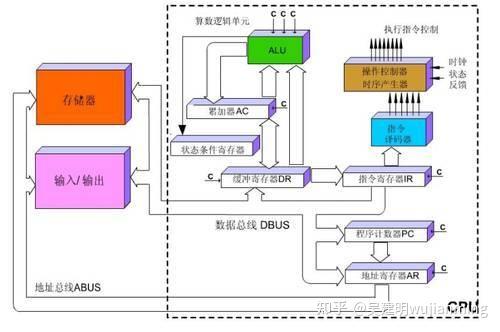
Figure: CPU execution instruction diagram
The CPU follows the von Neumann architecture , and its core is: stored programs and executed sequentially. In this structural diagram, the area occupied by the green area responsible for the calculation seems to be too small, while the cache cache of the orange area and the control unit of the yellow area occupy a lot of space.
Because the CPU architecture requires a lot of space to place the storage unit (orange part) and the control unit (yellow part) , in contrast, the computing unit (green part) only accounts for a small part, so it is extremely limited in large-scale parallel computing capabilities and is better at logical control.
In addition, because following the von Neumann architecture (storage programs, executed sequentially), the CPU is like a scheming butler, and it always does what people command it step by step. But as people’s demand for larger scale and faster processing speeds increases, the butler gradually becomes a little overwhelmed.
So, everyone wondered whether multiple processors can be placed on the same chip and worked together, so that the efficiency will be improved?
That’s right, the GPU was born.
GPU
Before formally explaining GPU, let’s talk about a concept – parallel computing.
Parallel Computing refers to an effective means to use multiple computing resources to solve computing problems at the same time and improve the computing speed and processing capabilities of computer systems. The basic idea is to use multiple processors to solve the same problem together, and the solved problem is broken down into several parts, each part being calculated in parallel by an independent processor.
Parallel computing can be divided into parallelism in time and parallelism in space .
Parallelism in time refers to assembly line technology. For example, when a factory produces food, it is divided into four steps: cleaning – disinfection – cutting – packaging.
If the assembly line is not used, the next food will be processed only after one food completes the above four steps, which will take time and affect efficiency. Using assembly line technology, four foods are processed simultaneously. This is the time parallelism in parallel algorithms, starting two or more operations at the same time, greatly improving computing performance.
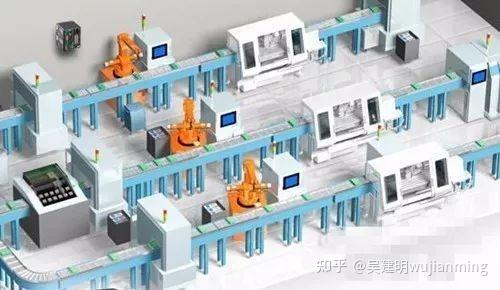
Figure: Schematic diagram of the assembly line
Parallelism in space refers to the concurrent execution of multiple processors, that is, connecting more than two processors through the network to achieve large-scale problems that can be solved by calculating different parts of the same task at the same time, or a single processor cannot solve.
For example, Xiao Li is preparing to plant three trees on Arbor Day. If Xiao Li takes 6 hours to complete the task, on Arbor Day, he called his good friends Xiaohong and Xiao Wang. The three of them started digging pits and planting trees at the same time. After 2 hours, each completed a tree planting task. This is the parallelism of space in the parallel algorithm, which divides a large task into multiple same subtasks to speed up the problem solving speed.
So, if the CPU is allowed to perform this tree planting task, it will plant one by one, and it will take 6 hours, but if the GPU is allowed to plant trees, it is equivalent to several people planting them at the same time.
The full name of the GPU is Graphics Processing Unit , which is a graphics processor in Chinese . Just like its name, the GPU was originally a microprocessor that runs drawing operations on personal computers, workstations, game consoles and some mobile devices (such as tablets, smartphones, etc.).
Why are GPUs particularly good at processing image data? This is because every pixel point on the image needs to be processed, and the process and method of each pixel point are very similar, which has become a natural breeding ground for GPUs.
The simple GPU architecture is shown in the figure below:
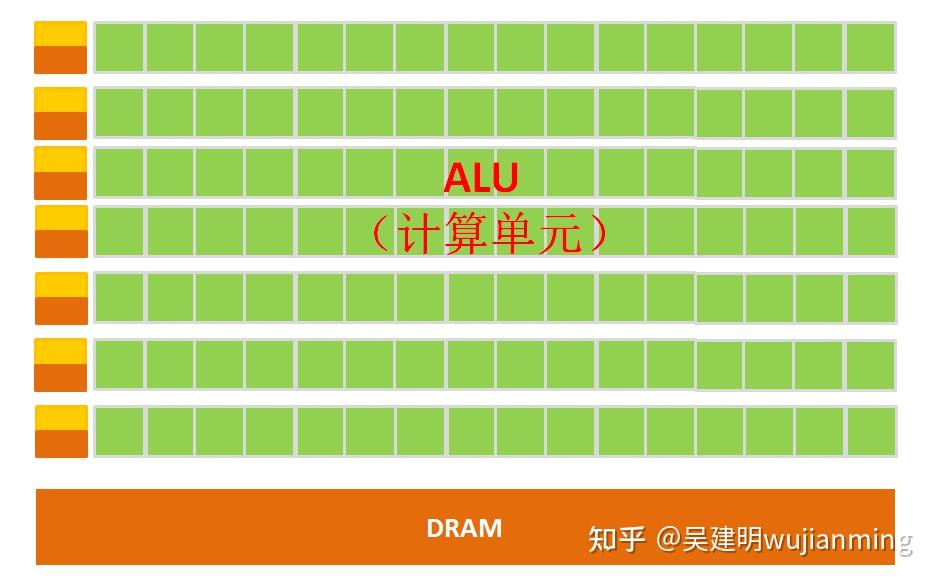
Figure: Schematic diagram of GPU micro architecture
It can be clearly seen from the architecture diagram that the composition of the GPU is relatively simple, with a large number of computing units and ultra-long pipelines, which are particularly suitable for processing a large number of unified data of types.
However, the GPU cannot work alone and must be controlled by the CPU to work . The CPU can act alone to process complex logical operations and different data types. When a large amount of data processing of unified types is required, the GPU can be called for parallel computing.
Note: There are many ALUs and very few cache caches in the GPU. The purpose of cache is not to save the data that needs to be accessed later. This is different from the CPU, but to improve the service of thread threads. If many threads need to access the same data, the cache will merge these accesses and then access the Dram.
Then put the CPU and GPU in the same picture and compare it, and it will be very clear at a glance.
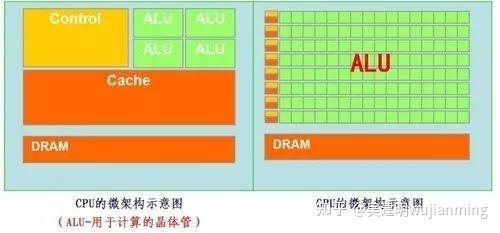
Most of the work of GPUs is computationally expensive, but it has no technical content, and it needs to be repeated many times.
To borrow the statement of a master on Zhihu, just like if you have a job that requires calculation of addition, subtraction, multiplication and division within a hundred times, the best way is to hire dozens of primary school students to calculate together, one person calculates part of it. Anyway, these calculations do not have much technical content, just physical work; and the CPU is like an old professor, and the integral and differentials can be calculated, which is the salary is high, and an old professor is worth twenty primary school students. If it is Foxconn, which one should I hire?
GPU uses many simple computing units to complete a large number of computing tasks, purely human-sea tactics. This strategy is based on a premise, that is, the work of primary school student A and primary school student B have no dependence on it and are independent of each other.
But one thing needs to be emphasized. Although GPU is born for image processing, through the previous introduction, we can find that there are no components that specifically serve images in structure , but only optimize and adjust the CPU structure. Therefore, now GPU can not only show its skills in the field of image processing, but is also used in scientific computing, password cracking, numerical analysis, massive data processing (sorting, Map-Reduce, etc.), financial analysis and other fields that require large-scale parallel computing.
Therefore, the GPU can also be considered a more general chip.
TPU
As mentioned above, both CPU and GPU are relatively general chips, but there is an old saying: universal tools are never as efficient as special tools.
As people’s computing needs become more and more specialized, people hope that chips can be more in line with their professional needs. At this time, the concept of ASIC (application-specific integrated circuit) was born .
ASIC refers to a special specification integrated circuit customized according to product requirements, designed and manufactured by specific users and specific electronic systems. Of course, this concept is not to be remembered, it is simply customized chips.
Because ASIC is very “specialized” and only does one thing, it will do better in a certain thing than chips such as CPUs and GPUs that can do many things, achieving higher processing speeds and lower energy consumption. But accordingly, the production cost of ASIC is also very high.
TPU (Tensor Processing Unit) is a chip developed by Google specifically to accelerate deep neural network computing capabilities, and it is actually an ASIC.
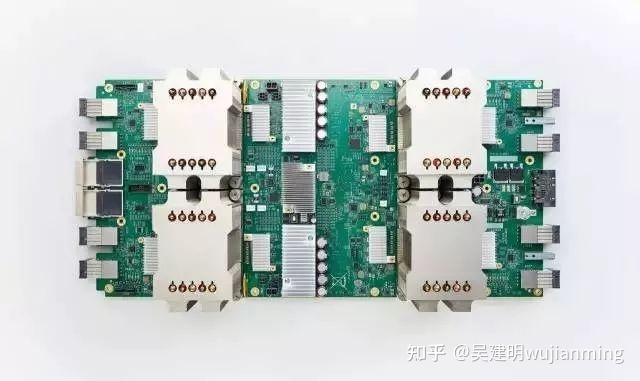
Picture: Google’s second generation TPU
It is difficult for ordinary companies to bear the cost and risks of developing specialized ASIC chips for deep learning, but who is Google, will people lose money?
The more important reason is that many services provided by Google, including Google image search, Google photos, Google cloud vision API, Google Translation and other products and services, all require deep neural networks. Based on Google’s own huge size, developing a specialized chip has the possibility of large-scale application (largely sharing R&D costs).
In this way, it is natural for TPU to enter the historical stage.
It turns out that most of the machine learning and image processing algorithms run on GPU and FPGA (semi-customized chip), but both chips are still a general chip, so they cannot adapt to machine learning algorithms more closely in terms of performance and power consumption. Moreover, Google has always believed that great software will shine even more with the help of great hardware, so Google wondered whether it could make a dedicated chip for machine learning algorithms for a dedicated machine, and TPU was born.
It is said that TPU can provide 15-30x performance improvements and 30-80x efficiency (performance/watt) improvements compared to CPUs and GPUs of the same period. The first generation of TPUs can only do inference and rely on Google Cloud to collect data and generate results in real time. The training process also requires additional resources; the second generation of TPUs can be used to train neural networks and inference.
Why is TPU so awesome in performance?
Google has written several papers and blog posts to explain this reason, so I will only give you some tips here.
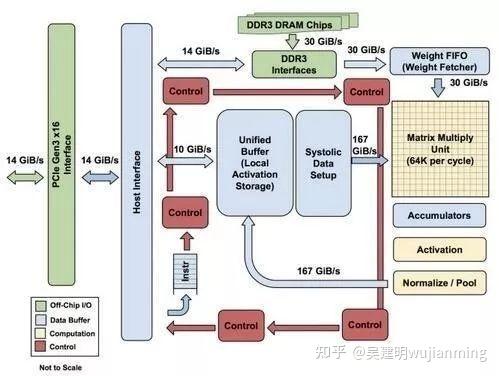
Figure: Block diagram of each TPU module
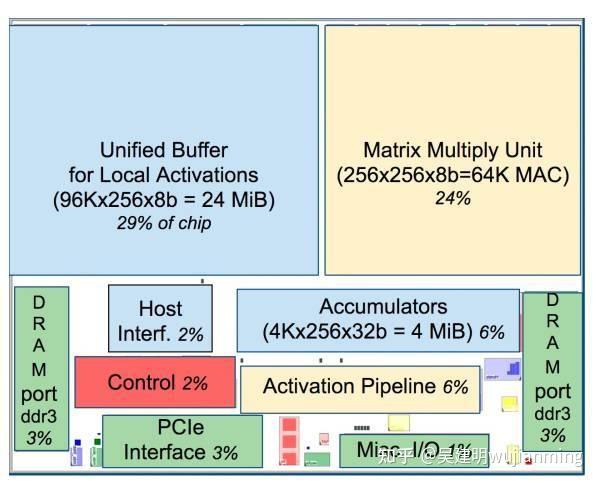
Picture: TPU chip layout diagram
As shown in the figure above, the TPU uses up to 24MB of local memory, 6MB of accumulator memory and memory used to connect with the main processor on the chip, accounting for 37% of the chip area in total (the blue part in the figure).
This means that Google fully realizes that off-chip memory access is the culprit of GPU’s low energy efficiency ratio, so it puts huge memory on the chip at all costs. In contrast, Nvidia’s K80 at the same time only had 8MB of on-chip memory and needed to continuously access off-chip DRAM.
In addition, the high performance of TPU also comes from tolerance for low computing accuracy. Research results show that the algorithm accuracy loss caused by low-precision computing is very small, but it can bring huge convenience in hardware implementation, including lower power consumption, faster speed, smaller chip area, and smaller memory bandwidth requirements… The TPU uses 8-bit low-precision computing.
For more information, please read Google’s papers.
So far, TPU has actually done a lot of things, such as the machine learning artificial intelligence system RankBrain, which is used to help Google process search results and provide users with more relevant search results; there is also the Street View, which is used to improve the accuracy of maps and navigation; of course, there is also the computer program AlphaGo, which plays Go!
NPU
I believe everyone has a certain understanding of these so-called “XPU” routines.
The so-called NPU (Neural network Processing Unit) is a neural network processor . As the name suggests, this guy wants to use circuits to simulate human neurons and synaptic structures!
How to imitate? Then we have to first look at the neural structure of humans – the biological neural network is composed of several artificial neuron nodes interconnected, and neurons are connected by synapses, which record the connection between neurons.
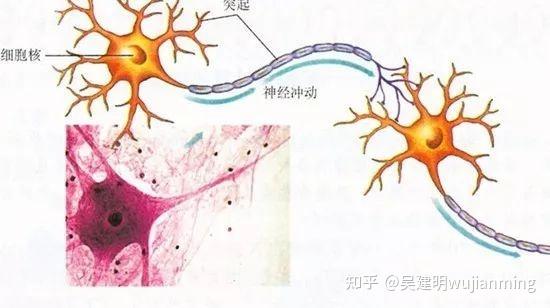
If you want to use circuits to imitate human neurons, you have to abstract each neuron into an excitation function, and the input of the function is determined by the output of the neuron connected to it and the synapses connecting the neurons.
In order to express specific knowledge, users usually need to adjust the synaptic values, the topological structure of the network in artificial neural networks, etc. (through certain specific algorithms). This process is called “learning.”
After learning, artificial neural networks can solve specific problems through the learned knowledge.
At this time, I don’t know if you have found any problems – it turns out that since the basic operations of deep learning are the processing of neurons and synapses, the traditional processor instruction set (including x86 and ARM, etc.) was developed for general computing. The basic operations are arithmetic operations (addition, subtraction, multiplication and division) and logical operations (and or non), and often hundreds or even thousands of instructions are required to complete the processing of a neuron, and the processing efficiency of deep learning is not high.
At this time, we must find a different approach – break through the classic von Neumann structure!
Storage and processing in neural networks are integrated and are both reflected through synaptic weights. In the von Neumann structure, storage and processing are separated and implemented by memory and arithmetic respectively. There are huge differences between the two. When using existing classic computers based on von Neumann structures (such as X86 processors and NVIDIA GPUs) to run neural network applications, they are inevitably subject to the constraints of storage and processing of separate structures, thus affecting efficiency. This is one of the reasons why professional chips specifically target artificial intelligence can have certain innate advantages over traditional chips.
Typical representatives of NPUs include domestic Cambrian chips and IBM’s TrueNorth . Taking the Cambrian in China as an example, the DianNaoYu instruction directly faces the processing of large-scale neurons and synapses. One instruction can complete the processing of a group of neurons and provide a series of special support for the transmission of neurons and synaptic data on the chip.
To put it in terms of numbers, CPUs and GPUs will have a performance or energy consumption ratio gap of more than 100 times compared to NPUs. Take the DianNao paper jointly published by the Cambrian team in the past and Inria as an example. DianNao is a single-core processor with a main frequency of 0.98GHz, and a peak performance of 452 billion neural network basic operations per second. The power consumption under the 65nm process is 0.485W and an area of 3.02 square millimeters mm.

The Kirin 970 chip used in Huawei mate 10 integrates Cambrian NPU, so it can realize the so-called photo optimization function, ensuring that the phone will not be stuck after using it for a long time (of course, you have to use it to know if there is such a good publicity).
PS. Although Zhongxing Microelectronics’ “Starlight Intelligence One” is known as an NPU, it is actually just DSP. It only supports forward network computing and cannot support neural network training.
Based on the above knowledge, it is easier to understand BPU and DPU.
BPU (Brain Processing Unit) is an embedded artificial intelligence processor architecture proposed by Horizon Technology . The first generation is the Gaussian architecture, the second generation is the Bernoulli architecture, and the third generation is the Bayesian architecture. Horizon has designed the first generation of Gaussian architecture and jointly launched the ADAS system (Advanced Driver Assistance System) with Intel at the 2017 CES show.
DPU (Deep learning Processing Unit, namely, deep learning processor) was first proposed by domestic Shenjian Technology . It is based on Xilinx’s reconfigurable FPGA chip, designed a dedicated deep learning processing unit (can design parallel and efficient multiplier and logic circuit based on existing logic units, which belongs to the IP category), and abstracts customized instruction sets and compilers (rather than using OpenCL), thereby achieving rapid development and product iteration. In fact, the DPU proposed by Shenjian belongs to semi-customized FPGAs.
It is said that every 18 days, an additional XPU will appear in the integrated circuit field until the 26 letters are used up.
This is nicknamed the XPU version of Moore’s Law in the AI era.
According to incomplete statistics, those that have been used up are:
APU — Accelerated Processing Unit, Accelerated Processing Unit , AMD launched an accelerated image processing chip product.
BPU — Brain Processing Unit , an embedded processor architecture dominated by Horizon.
CPU — Central Processing Unit Central Processing Unit , currently the mainstream product of PC core.
DPU — Deep learning Processing Unit, a deep learning processor , first proposed by domestic Shenjian Technology; it also says that there is the Dataflow Processing Unit data stream processor, the AI architecture proposed by Wave Computing; Data storage Processing Unit, an intelligent solid-state hard drive processor of Shenzhen Dapuwei.
FPU — Floating Processing Unit Floating point computing unit , floating point computing module in general processors.
GPU — Graphics Processing Unit, graphics processor , adopts a multi-threaded SIMD architecture, and is born for graphics processing.
HPU — Holographics Processing Unit Holographic image processor , a holographic computing chip and device produced by Microsoft.
IPU — Intelligence Processing Unit , an AI processor product produced by Graphcore, a company invested by Deep Mind.
MPU/MCU — Microprocessor/Micro controller Unit , microprocessor/micro controller, is generally used for low-computing applications RISC computer architecture products, such as ARM-M series processors.
NPU — Neural Network Processing Unit , a general term for neural network processors, new processors based on neural network algorithms and acceleration, such as the diannao series produced by the Institute of Computing, Chinese Academy of Sciences/Cambrian.
RPU — Radio Processing Unit, radio processor , a collection of Wifi/Bluetooth/FM/processor launched by Imagination Technologies is a monolithic processor.
TPU — Tensor Processing Unit tensor processor , a dedicated processor for accelerating artificial intelligence algorithms launched by Google. Currently, the first generation of TPU is aimed at Inference and the second generation is aimed at training.
VPU — Vector Processing Unit vector processor , Intel acquired Movidius to accelerate computing core of image processing and artificial intelligence dedicated chips.
WPU — Wearable Processing Unit, a wearable processor , a wearable system-on-chip product launched by Ineda Systems, including GPU/MIPS CPU and other IPs.
XPU — FPGA intelligent cloud acceleration released by Baidu and Xilinx at the 2017 Hotchips Conference , including 256 cores.
ZPU — Zylin Processing Unit, a 32-bit open source processor launched by Norway’s Zylin.
When the 26 letters are used up, XXPU, XXXPU will appear, and the naming world will be occupied at a faster speed.
I believe you have also gained a preliminary understanding of the concepts of these XPUs.